
This article will walk you through the steps to close or archive an interview.
Closing an Interview
Closing an Interview allows you to temporarily shut off responses for that interview. You can re-open any closed interview. To close an interview follow the steps below:
- In the Interviews page, click the three dots on the interview you'd like to close and click Close.
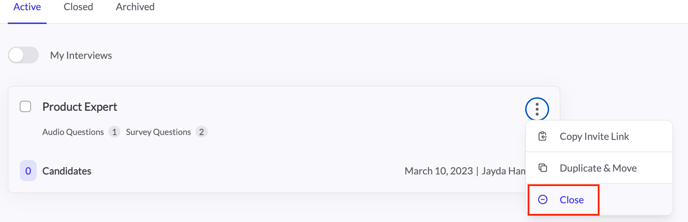
- Once closed, you will be able to view that interview in the Closed tab on the Interviews page.
Archiving an Interview
Archiving an Interview allows you to “delete” an interview you no longer want to interview candidates for. To archive an interview follow the steps below.
Note: You can only archive closed interviews and you cannot reopen an archived interview. You will always be able to reference any archived interview, along with its corresponding candidates.
- In the Interviews page, click the Closed tab.
- Click the three dots for the interview you would like to archive and click Archive.
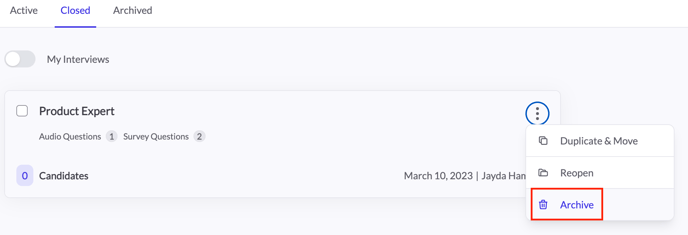
- A pop up will appear, warning that once an interview is archived it cannot be reopened. Click Archive.
If you have any questions or need assistance, please email service@qualifi.hr