
When you want to allow candidates to apply to an interview without sending an invite you can use a QR code or an open interview link.
Open Interview Link
To use an open interview link or a QR code follow the steps below:
- Log in to your Qualifi account.
- Click Interviews on the left side of your dashboard.
- Click into any interview you've created and scroll down to the Open Interview section.
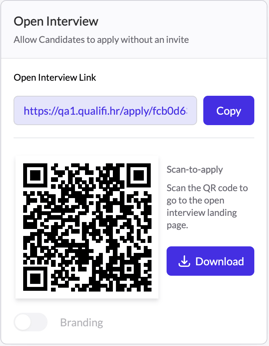
- Here you will find:
- Open Interview Link
- QR Code
- You may copy both the link or QR code and use them wherever you see fit. ie; job postings, job fairs, on-site.
If you have any questions or need assistance, please email service@qualifi.hr.