
This article breaks down all of the roles and permissions within Qualifi to ensure all your Teammates have the correct access
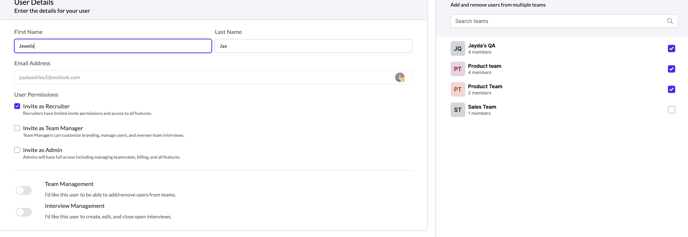
There are three User types within Qualifi that you can invite a Teammate as: Admin, Team Manager, and Recruiter.
Admin
A User with Admin permissions can decide each new and existing User's permissions and what feature(s) they can access. They have full access managing teammates, billing, and all features within the platform for all Teams.
Team and Interview Management are automatically included for Users with Admin access.
Team Manager
A User with Team Manager permissions can decide each new and existing User's permissions and what feature(s) they can access within their Team. They have full access managing teammates, billing, and all features within the platform for only the Teams they are in.
Team and Interview Management are automatically included for Users with Team Manager access, but only for the Teams they are within.
Recruiter
A User with Recruiter permissions has limited access to all features within Qualifi. This type of User will automatically be disabled from Team and Interview Management, but these can be enabled by toggling the button when inviting a teammate.
Team and Interview Management can be enabled for Users with Recruiter access for the ability to create, edit, and remove Teams and Interviews within Qualifi.
- Team Management: Allows the Recruiter to add/remove Users and add/remove Teams.
- Interview Management: Allow the Recruiter to create, edit, and close open Interviews.
If you have any questions or need assistance, please email service@qualifi.hr