
This article goes over how to share one or many candidate interviews to other teammates, as well as reviewing the Share Activity of a candidate.
If you want to specify what responses to share, please see Choosing Shareable Questions
Sharing a Single Candidate
To share a single candidate follow the steps bellow:
- Log in to your Qualifi account.
- Click the Candidates tab on the left side of your dashboard.
- Click the three dots next to the candidate's interview you'd like to share and select Send Share Link.

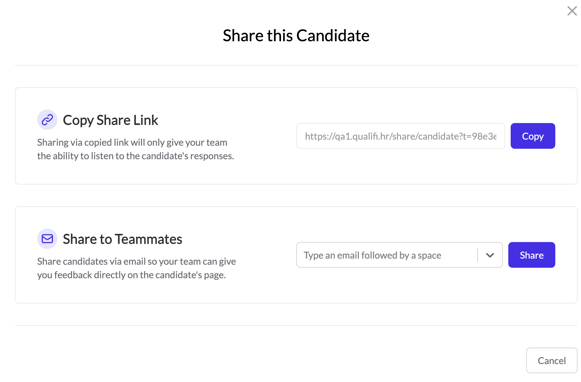
- A pop-up will appear (Share This Candidate) where you will be able to share this interview in one of two ways:
- Link to Share - this allows you to quickly copy and distribute a candidate's interview in whatever way you see fit. The recipient(s) will NOT have the ability to leave interview notes or ratings.
- Invite Your Teammates - this allows you to send a candidate's interview directly through email. The recipient will be able to leave interview notes and rate through this method.
Sharing Multiple Candidates
To share multiple candidates follow the steps below:
- Log in to your Qualifi account.
- Click the Candidates tab on the left side of your dashboard.
- Select each candidate record you want to share, and click Share.
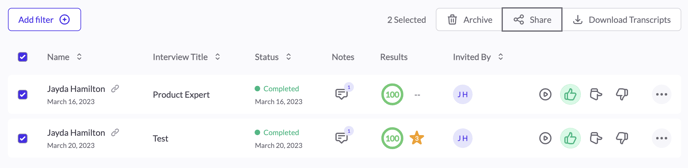
- A pop-up will appear (Export Candidate Information) where you will be able to share multiple candidate interviews in one of two ways:
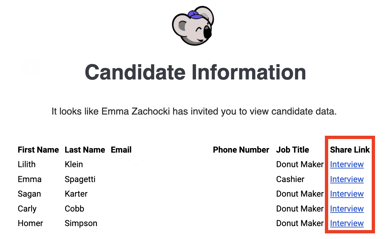
- Share via email - Here you may type in multiple different emails to receive each candidates interview. They will receive an email like the one below with a hyperlink to each interview. The recipient(s) will have the ability to leave interview notes.
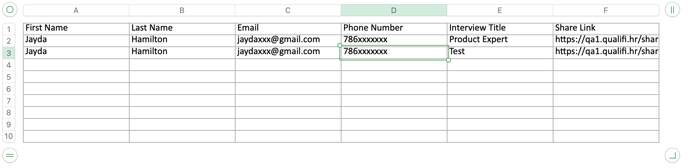
- Download Candidate Information - Here you may download an excel document with the candidates information along with a link to their interview, like the one below, that you may distribute in whatever way you see fit. The recipient(s) will need to copy the link and paste it into their browser. They will not have the ability to leave notes.
- Share via email - Here you may type in multiple different emails to receive each candidates interview. They will receive an email like the one below with a hyperlink to each interview. The recipient(s) will have the ability to leave interview notes.
If you have any questions or need assistance, please email service@qualifi.hr.